KAmod IMX477
From Kamamilabs.com - Wiki
Description
KAmod IMX477 - 12.3 MPx camera module for Raspberry Pi
The module is equipped with an IMX477 image sensor with a resolution of 12.3 MPx and an M12 mount lens with a 160° field of view. It enables video recording at resolutions of 1080p30, 720p60, or 640x480p60/90. The MIPI CSI-2 lane interface is compatible with Raspberry Pi computers and brought out to a 15-pin FPC/FFC connector. The board has compact dimensions of 26 x 25 mm, making it ideal as a sensor in drones, robotics, or face recognition applications.

Basic parameters
- Image sensor module
- Type: IMX477
- Resolution: 4056 x 3040, 12.3 MP
- Sensor size: 7.9 mm diagonal
- Pixel size: 1.55 μm x 1.55 μm
- Interface: MIPI CSI-2 lane, 15-pin connector, 1 mm pitch
- Default lens mount: M12x0.5 thread
- Video format: 1080p30, 720p60, and 640 × 480p60/90
- Power supply: 3.3 V
- Dimensions: 26 x 25 mm, height with lens approx. 27 mm
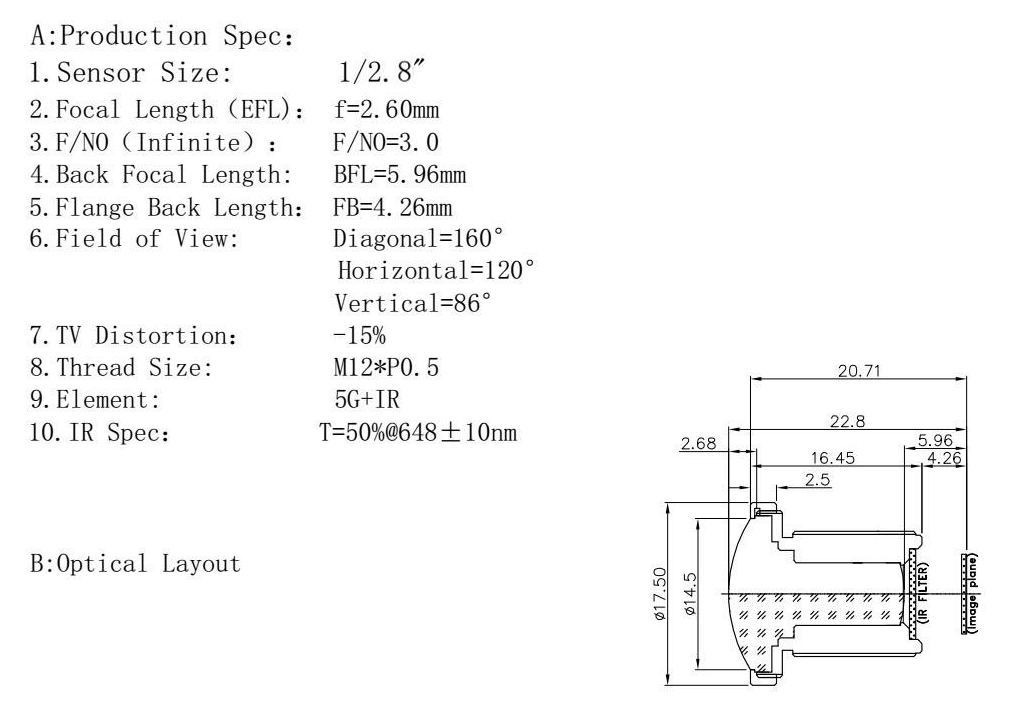
- Lens
- Focal length (BFL): 5.96
- Optical format: 1/2.8″
- Aperture (F): 3.0
- Field of view (FOV): 160°(D) 120°(H) 86°(V)
- IR sensitivity: built-in IR filter
- Lens standard: M12 (S-mount)
Standard equipment
| Component | Description |
|---|---|
| KAmod IMX477 |
|
| FPC 15-pin/1mm to 22-pin/0.5mm |
|
| FFC 15-pin/1mm to 15-pin/1mm |
|

Signal connector
KAmod IMX477 features a MIPI CSI-2 lane interface with a connector for 15-pin/1mm FPC/FFC ribbon cables. The pinout is shown in the figure.

Connecting the module
SBC computers feature two types of camera connectors:
- FPC/FFC 15-pin/1 mm, e.g., RPi3, RPi4, Jetson Nano
- FPC/FFC 22-pin/0.5 mm, e.g., RPi5, RPi Zero 2 W, Jetson Orin
The KAmod IMX477 kit includes ribbon cables compatible with both standards. When connecting, make sure that the metallic contacts of the ribbon cable are facing towards the connector contacts on both the KAmod IMX477 module and the computer board.
The correct orientation of contacts is shown in the figures.
Connecting the ribbon cable to the KAmod IMX477 module

Connecting the ribbon cable to Raspberry Pi 5

Connecting the ribbon cable to Raspberry Pi 4

Connecting the ribbon cable to Nvidia Jetson Orin Nano

Running the module on Raspberry Pi OS
Connect the KAmod IMX477 camera module to the CAM/DISP0 or CAM/DISP1 connector according to the previous instructions.
The new Raspberry Pi OS (Bookworm/Trixie) has built-in support for the IMX477 sensor, so no additional drivers are required. After booting Raspberry Pi 5, you only need to edit the config.txt file. First, enter the following command:
sudo nano /boot/firmware/config.txt
Now locate the following line in the file: camera_auto_detect=1
and change its value to 0: camera_auto_detect=0
Next, at the end of the file in the [all] section, add:
dtoverlay=imx477,cam0
or
dtoverlay=imx477,cam1
depending on which connector the camera module is connected to. If two camera modules are connected, add both lines.
Finally, save the file using the key combination CTRL + O (confirm with Enter) and exit the editor using CTRL + X (confirm with Enter). After rebooting with the command sudo reboot, the single-board computer is ready for use.
You can start the camera preview using the command:
rpicam-hello -t 0 --camera 0
or
rpicam-hello -t 0 --camera 1
depending on which connector the module is connected to. To stop the process, press CTRL + C.
More information about the rpicam module can be found here:
Raspberry Pi Camera software
Module dimensions
The board dimensions are 26 x 25 mm, and the height including the lens is approx. 27 mm. Mounting holes are provided on the board; their arrangement is shown in the figure.